An educational introduction to Apache Arrow
Apache Arrow is everywhere nowadays, and if you are a data engineer, your favorite tools/frameworks probably have one of its libraries as a dependency. The official list of products that use Apache Arrow is filled with big players in the data ecosystem and new systems built on top of the Apache Arrow based query engine Apache DataFusion pop up regularly. It seems that no other project is shaping the future of the data landscape quite like Apache Arrow does. So, as a data engineer, trying to understand what all the fuss is about came naturally to me.
Getting a high-level overview of Apache Arrow is easy. There are many good (and quite recent) blog posts on its history and the problems it solves, see this or that one. The Apache Arrow project page is also very well written. But for someone like me, who lacked a lot of basic computer science or system programming knowledge, Apache Arrow never really "clicked". This blog post aims to fill this gap. I will cover the concepts that are needed to not just believe that a standardized columnar memory layout makes sense, but to actually get that its creation was inevitable. But note, that I am not an expert on these topics and I will omit details for readability. To get the full picture please refer to the specifications.
What actually is Apache Arrow?
For me, things that are not just installable libraries or frameworks are always harder to grasp.
Apache Arrow is just like this, and in addition consists of many different parts.
Yes, you can install "Apache Arrow" for example in Python by running pip install pyarrow and then use it like any other library.
But this library is merely one implementation of what Apache Arrow is all about.
Apache Arrow is foremost one thing: a language-agnostic in-memory columnar data structure specification. To put this in simpler terms, we can unpack it from the end:
- Specification: Apache Arrow is not just a single implementation, but a highly detailed description containing all the information needed to implement what it describes.
- Columnar data structure: Apache Arrow describes a two-dimensional data structure with rows and columns, like a dataframe. It is structured so that values from the same column are stored close to each other, rather than grouping values by row.
- In-memory: The data structure lives in a region of a process's memory. Apache Arrow describes how this flat region must be interpreted to understand it as the two-dimensional data structure and how specific parts can be accessed by simply jumping to the appropriate location in memory.
- Language-agnostic: The data structure Apache Arrow describes is not bound to any specific or group of programming languages. This is because it describes how the data structure is laid out in memory, which is important for the running program, i.e. the process. However it does not matter which programming language was used to create the program.
While this specification sits at the core of Apache Arrow, it is not its only component. In addition, Apache Arrow is also the implementations of this specification in more than ten programming languages, including C++, Python and Rust. After all, what is a specification worth if there are no ready-to-use implementations?
With the specification and multiple implementations to choose from we would be ready to go to use Apache Arrow for a program that runs in isolation. But what if we want to exchange data between processes? To cover this, Apache Arrow also defines several protocols that specify how its in-memory data structure can be serialized into a stream of binary payloads and reconstructed somewhere else. Here, for simplicity, I will only cover Apache Arrow's inter-process communication (IPC) protocol.
While Apache Arrow includes even more components, and I will ignore things in the following like the C data interface, canonical extension types and the Arrow database connectivity, the above-stated components are enough to outline how Apache Arrow revolutionized the data tooling landscape. The first step is to understand what problem led to the creation of Apache Arrow and how it solves it.
The problem Apache Arrow is solving
In short, Apache Arrow solves the problem that our computers spend a lot of time just copying and reconstructing data structures when we pass them around in our program or send them to others. When we create a data structure in our program, it is backed by some region in memory, and because we created it our program knows how to interpret this region. Also, we can reference or pass this data structure to a function without copying any data, by simply using a pointer to this memory region. However problems arise when our data structure crosses boundaries. By boundaries, I mean situations where data moves in a way that loses the information about how the memory region should be interpreted. Such boundaries can occur in the same process when libraries that are implemented in different programming languages are used, e.g. using the DuckDB Python library (written in C) on a pandas DataFrame, or between different processes where the data must be sent via inter-process communication (IPC), e.g. PySpark passing data from the Python runtime to the JVM.
Take for example how lists in Python and NumPy arrays use different memory layouts. In this simple snippet:
import numpy as np

a = [1, 2, 3]
b = np.array(a)
we create the logical data structure of an array of three integers first as a Python list and then use this data structure as an input to create a logically identical NumPy array.
While they logically the same, we could have assumed that our list and array reference the same memory region, but instead the creation of the NumPy array has allocated a new region and copied the underlying values of the list there.
This is because a list is implemented in CPython as a PyListObject that contains pointers to other PyObjects.
In contrast, a NumPy array uses a contiguous region of memory.
Obviously, these layouts are not compatible and form a sort of boundary where memory must be copied.
Another example is IPC, where the information needed to interpret a region of memory is not available to the receiving process that only sees a stream of bytes. At this kind of boundary, this missing information must be included. This is usually done by serializing a memory object into something that can be transferred and then reconstructed, i.e. deserialized. For example dumping a Python dictionary into a JSON string and sending it over the network to a server, which can reconstruct the Python dictionary by parsing the JSON or using Python's pickle module that (greatly simplified) encodes instructions for how to reconstruct a Python object. Whatever approach one chooses, the CPU on both, the sending and the receiving side, has to do work.
Here comes Apache Arrow's time to shine. By defining a standard for how its data structure is laid out in memory, libraries can implement against it. This allows them to share the same data structure using a common memory layout. Also, when sending this data structure as a byte stream between processes, it can be understood directly, because what it represents is described in the specification. In this way, Apache Arrow makes our programs do less boring parsing and reconstructing work, while also saving memory, because no redundant copies have to be made.
The memory layout
The aforementioned two-dimensional columnar data structure is called a RecordBatch. You can view this data structure like part of a table that holds some number of records. It has a schema that defines its columns via fields, i.e. their names, datatypes, and wether they are nullable. And it holds the actual values of these columns, which are called arrays in the naming convention of Apache Arrow. These arrays are made up of one or more buffers, which are just a contiguous region of memory, i.e. the actual memory layout.
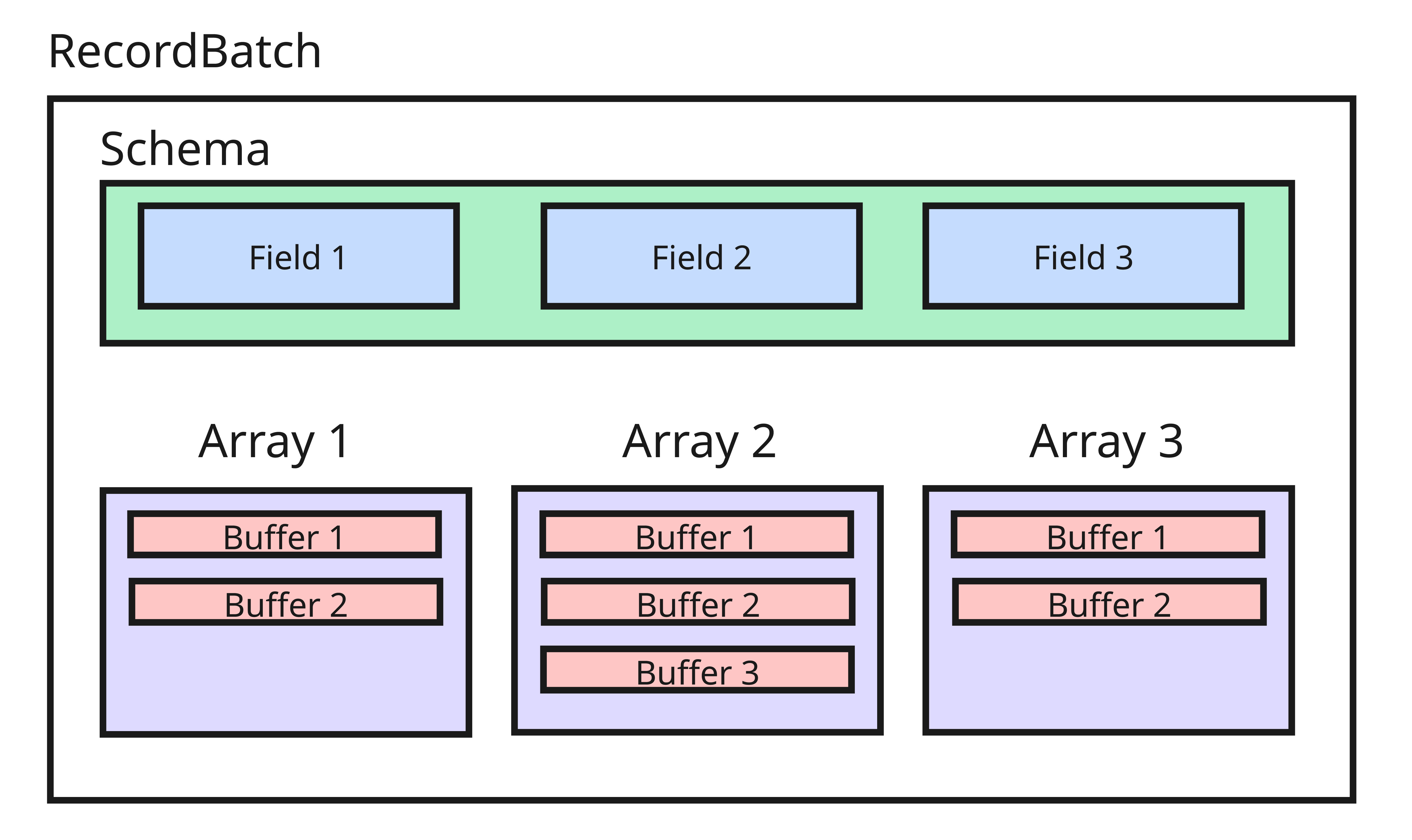
And at this point comes a fundamental aspect of Apache Arrow: the split between metadata and actual data. The actual data is what is stored in the buffers and this is what Apache Arrow specifies. It defines a number of logical data types, e.g. Int, Date, Utf8 or List, that an array could have and associates a physical memory layout to them. These layouts state what buffers are needed to store values of a data type. This mapping of data type to buffers is what Apache Arrow standardizes and what every implementation has to do the same way. On the other hand, how the metadata is represented in memory is not specified by Apache Arrow and can be handled by every implementation how it wants.
Briefly said, metadata is everything that is not actual data, i.e. not buffers. Therefore an array that represents a column of a logical data type is in the end just a collection of metadata that states what data type the array has and where to find all the buffers that actually store its data. See for example how a PrimitiveArray is implemented in rust:
pub struct PrimitiveArray<T: ArrowPrimitiveType> {
    data_type: DataType,
    values: ScalarBuffer<T::Native>,
    nulls: Option<NullBuffer>,
}
, where data_type gives the logical data type and values and nulls are just buffers that store the actual data. The same holds for the RecordBatch:
pub struct RecordBatch {
   schema: Arc<Schema>,
   columns: Vec<Arc<dyn Array>>,
   row_count: usize,
}
, which is just a collection of schema and arrays, i.e. metadata objects. In addition it also has a row_count that must be shared by all its arrays, because columns with unequal length would be invalid.
Let's make these relationships clearer with an example. Imagine we want to use Arrow to store the following logical tabular data as a RecordBatch:
| age | name |
|---|---|
| 33 | Alice |
| null | Bob |
| 67 | Charlie |
On the metadata side we need the following:
- A schema that describes our data. In our case it could simply be written as:
columns:
 - name: "age"
   data_type: "Int"
   nullable: true
 - name: "name"
   data_type: "Utf8"
nullable: false- One array per column that contain the buffers that store the actual data.
For storing the actual data let's start with the first column age.
This column has the data type Int and following Apache Arrow's specification, we find that it must be encoded using the fixed-size primitive layout.
This is a very simple layout that only consists of two buffers:
- Validity buffer: Encodes wether a value is null.
- Value buffer: Stores the actual integer. In our example they would look like this (with 32 bit integer):

Note here that Arrows uses little-endian bit numbering for the validity buffer, i.e. you must read it from right to left, and that most of this example is just padding to get 64 bytes long buffers. More on the latter later.
For encoding the name column we must use the variable-size binary layout.
Due to the variable length of the strings (UTF-8 Encoding) this is more complex and needs three buffers:
- Validity buffer: Same as above but can be omitted as the column is not nullable.
- Value buffer: The actual values stored right next to each other.
- Offset buffer: Stores the start position of each value in the value buffer. This allows to reconstruct where a value start and where it ends to allow for variable-sized values.
In our example things would look like:

In essence, that's all there is to it: define your metadata and use the associated layout for your data types to encode the values. But note that this was just a very simple example. Apache Arrow defines more than 25 data types and there are also nested layouts that are made up of multiple layouts with relationships, so things can get complex. But with the basics of how the memory layout works explained, let's look into a few aspects why it was defined this way.
Why the memory layout is also smart
Apache Arrow not only defines a standardized memory layout that allows for easy sharing of data, it is also designed to be highly efficient. This is because it takes into account the kind of operations typically used on the data and how modern CPUs access memory.
As described above, Apache Arrow stores all values of a column inside one buffer, instead of storing all values of a record contiguously. While the latter could also be used to build a standardized layout, using a columnar format brings multiple benefits. First it is optimized for typical online analytical processing queries that do projections, i.e. only selecting a subset of columns, and aggregations over large number of records. By using a contiguous region of memory for individual columns a projection operation can simply select the buffers of interest instead of scanning the entire memory region to find the selected column values of each record. For aggregations the Principle of Locality is fully used, as big regions of columns values will be loaded into the CPU registers and cache hits are more likely.
Additionally, the buffers are allocated in such a way that their start and end points are aligned with memory addresses that are a multiples of 8 or 64 bytes. If a buffer contains not enough data padding is used to over-allocate memory to ensure this alignment. This is similar to how modern computers place Data alignment restrictions on the allowable addresses for primitive data types to ensure that the CPU can access them with the minimum number of instructions. This is also one of the reasons Apache Arrow does this, but in addition using e.g. 64-bytes alignment ensures an efficient use of the Single instruction multiple data (SIMD) registers, see here.
Example: Zero-copy
Let's have a look at a concrete example of how Apache Arrow's standardized memory layout can help to avoid making copies, i.e. zero-copy, when passing data between different libraries in the same process.
For this, we will use Python and first define a function to measure the change of memory usage of our program:
import os

import psutil

process = psutil.Process(os.getpid())

def measure(operation_name):
    """Decorator to measure memory usage"""
    def decorator(func):
        def wrapper(*args, **kwargs):
            mem_before = process.memory_info().rss
            result = func(*args, **kwargs)
            mem_after = process.memory_info().rss
            print(f"\n{operation_name}")
            print(f"  Memory allocated: {(mem_after - mem_before) / 1024**2:.2f} MB")

            return result
        return wrapper
    return decorator
Then we generate some random string data and build two pandas DataFrames, one with the standard memory layout and the other with the Apache Arrow memory layout:
import random
import string

import pandas as pd

def generate_random_string(length=10):
    return "".join(random.choices(string.ascii_letters + string.digits, k=length))

n_rows = 1_000_000

data = {
    "x": [generate_random_string() for _ in range(n_rows)],
    "y": [generate_random_string() for _ in range(n_rows)],
}

@measure("Traditional pandas DataFrame")
def create_trad():
    return pd.DataFrame(data)

@measure("Arrow-backed DataFrame")
def create_arrow():
    return pd.DataFrame(data, dtype="string[pyarrow]")

df_trad = create_trad()
df_arrow = create_arrow()
This prints the following result:
Traditional pandas DataFrame
Memory allocated: 30.10 MB
Arrow-backed DataFrame
Memory allocated: 56.62 MB
Compared to the traditional pandas DataFrame the one with the Apache Arrow layout has a larger memory footprint, which is probably due to different string representation, padding, and additional buffers (offsets and validity bitmaps). However, Apache Arrow does not optimize for minimum memory usage, but reusability. So let's have a look at what happens if we create a Polars from the pandas ones:
import polars as pl

@measure("Traditional: pl.from_pandas(df_trad)")
def to_polars_trad():
    return pl.from_pandas(df_trad)

@measure("Arrow: pl.from_pandas(df_arrow)")
def to_polars_arrow():
    return pl.from_pandas(df_arrow)
Which prints:
Traditional: pl.from_pandas(df_trad)
Memory allocated: 31.62 MB

Arrow: pl.from_pandas(df_arrow)
Memory allocated: 1.88 MB
This shows that we needed to make another copy of the data when using the traditional pandas DataFrame as a source. On the other hand for the DataFrame that uses the Apache Arrow memory layout, the buffers could just be reused and only a small amount of metadata needed to be allocated.
IPC
Now that we know about all the advantages of the RecordBatch memory layout, wouldn't it be great to communicate it efficiently between processes? This is possible by using the inter-process communication (IPC) protocol of Apache Arrow. The key idea of this protocol is that the buffers that make up a RecordBatch can just be sent around as byte streams and the receiving process can use them without having to parse them. But to actually "reconstruct" the RecordBatch the sending process must include metadata that states what the buffers actually represent.
Before going into the details of the IPC protocol, let's first look at one way that data can be exchanged between processes. Imagine I want to send the following Python dictionary from one process to another via TCP:
data = {
    "name": "Alice",
    "age": 30,
    "scores": [10, 20, 30]
}
I could do this by first serializing it into a string, encoding it and sending it over a socket.
import json
payload = json.dumps(data)
sock.send(payload.encode())
The receiving side just sees raw bytes:
b'{"name":"Alice","age":30,"scores":[10,20,30]}'And to get a dictionary it must first decode them, scan the bytes character by character and recreate the content of the dictionary:
data = json.loads(received_bytes.decode())Here, the original bytes are copied in the newly created object and the CPU has to do work. Now Apache Arrow tackles this differently by first using a standard binary format that a receiver can always handle in the same way and second by including metadata as a form of "recreation manual" that can be instantly "deserialized".
The standard binary format of Apache Arrow's IPC is the encapsulated message format, which looks like this:

It consists of:
- A 32-bit continuation indicator. The value 0xFFFFFFFF indicates a valid message. This is useful for knowing when a new message starts.
- A 32-bit little-endian length prefix indicating the metadata size. This is needed to know how many bytes should be looked at to read the metadata. Remember that we only want to read the metadata and not all the data.
- The actual metadata encoded as Flatbuffers.
- Padding to an 8 byte boundary for Data alignment restrictions.
- The actual data buffers.
This encapsulated message format is the only kind of format that is sent around, so a communication is just multiple of these messages strung together one after another. But inside this message format various message types can be stored, e.g. a Schema or RecordBatch message. What type of message is encapsulated is encoded within the metadata. Therefore, to correctly understand what type of message a process receives, it first has to identify that a new message starts via the continuation indicator and then use the metadata size to read all of the metadata.
The metadata is in fact created using a serialization framework called Flatbuffers. Here a schema is used to serialize an object by creating a binary buffer that uses offsets to organize nested structures. This way one can just jump directly to the desired location in the buffer where the desired data field is by using an offset. So to make matters more complex Apache Arrow's serialization is dependent on another serialization framework. But by leveraging Flatbuffers the metadata is just "understood" instantly by the receiver and it can use it to build the corresponding Apache Arrow object.
For example for the Schema message type the Flatbuffers schema could look something like this:
table Schema {
  /// List of fields
  fields: [Fields];
}

root_type: Schema
Where a field has a name and some associated data type. Other than that, no actual data would be needed and the metadata that was serialized using this schema could be instantly used to construct an Apache Arrow schema.
As another example let's look at a (simplified) Flatbuffers schema for a RecordBatch message type:
table RecordBatch {
  /// Number of records
  length: long;
  /// List of buffers
  buffers: [Buffer];
}

struct Buffer {
  /// The relative offset in the actual data binary stream
  offset: long;

  /// The length of the buffer
  length: long;
}

root_type: RecordBatch
This encodes the buffer structure of the actual data block at the end of a message by stating the offset and length of each buffer. Here the actual data block for a RecordBatch message is just all of its buffers laid out sequentially. This in combination with a schema allows us to understand what kind of data the buffers represent and therefore reconstruct the RecordBatch.
To now actually send RecordBatches between processes one uses the IPC streaming protocol. Here, first a Schema message is sent and then one or more RecordBatch messages are sent that each use the same schema.
Example: IPC serialization
As a final example, let's compare how to serialize and deserialize a pandas DataFrame using pickle and Apache Arrow’s IPC streaming protocol.
For this, we will reuse our generate_random_string function and create a new pandas DataFrame using the Apache Arrow memory layout:
n_rows = 1_000_000

data = {
    "x": [generate_random_string() for _ in range(n_rows)],
    "y": [generate_random_string() for _ in range(n_rows)],
}

df_pandas = pd.DataFrame(data, dtype="string[pyarrow]")
We then measure how long it takes to deserialize this pandas DataFrame using pickle:
import pickle
import time

# Serialize
start = time.perf_counter()
pickled_data = pickle.dumps(df_pandas)
pickle_serialize_time = time.perf_counter() - start

# Deserialize
start = time.perf_counter()
df_pickle_loaded = pickle.loads(pickled_data)
pickle_deserialize_time = time.perf_counter() - start

print(f"Serialize time:   {pickle_serialize_time:.3f}s")

print(f"Deserialize time: {pickle_deserialize_time:.3f}s")

print(f"Total time:       {pickle_serialize_time + pickle_deserialize_time:.3f}s")
This prints:
Serialize time:   0.158s
Deserialize time: 0.055s
Total time:       0.214s
Now we do the same using the IPC streaming protocol and compare the results:
import pyarrow as pa

# Create arrow RecordBatch
arrow_record_batch = pa.RecordBatch.from_pydict(data)

# Serialize
start = time.perf_counter()
sink = pa.BufferOutputStream()
writer = pa.ipc.new_stream(sink, arrow_record_batch.schema)
writer.write(arrow_record_batch)
writer.close()
arrow_data = sink.getvalue()
arrow_serialize_time = time.perf_counter() - start

# Deserialize
start = time.perf_counter()
reader = pa.ipc.open_stream(arrow_data)
arrow_record_batch_loaded = reader.read_all()
arrow_deserialize_time = time.perf_counter() - start

print(f"Serialize time:   {arrow_serialize_time:.3f}s")

print(f"Deserialize time: {arrow_deserialize_time:.3f}s")

print(f"Total time:       {arrow_serialize_time + arrow_deserialize_time:.3f}s")

print("=" * 50)
print("COMPARISON")
print("=" * 50)

print(
    f"Speedup (serialize):   {pickle_serialize_time / arrow_serialize_time:.2f}x faster"
)

print(
    f"Speedup (deserialize): {pickle_deserialize_time / arrow_deserialize_time:.2f}x faster"
)

print(
    f"Speedup (total):       {(pickle_serialize_time + pickle_deserialize_time) / (arrow_serialize_time + arrow_deserialize_time):.2f}x faster"
)
This prints:
Serialize time:   0.054s
Deserialize time: 0.003s
Total time:       0.058s

==================================================
COMPARISON
==================================================

Speedup (serialize):   2.91x faster
Speedup (deserialize): 16.82x faster
Speedup (total):       3.70x faster
While this may not be a fair or complete comparison, it shows that we can deserialize data faster using Apache Arrow. This also highlights how much faster deserialization can be when buffers are reused and metadata is read directly using FlatBuffers.
Parting thoughts
I hope this kind of educational introduction to Apache Arrow can help some of you wrap your heads around it. I learned a lot while writing this blog post, and Apache Arrow feels much less daunting now. But please keep in mind that I left out a lot of details and simplified many aspects to keep this post at a m reasonable length. To go deeper, take your time and read the specifications yourself.